
Description
KMS Field Health helps WordPress site owners and developers understand their Advanced Custom Fields (ACF) configuration. Explore field groups and nested fields, locate supported configuration findings, and inspect the evidence before deciding what to review.
The free plugin provides useful structural information even when no findings are detected. No account, subscription, or license activation is required by KMS Field Health.
Explore your ACF structure
- Find field groups by title and key, with active state, field counts, and collection coverage.
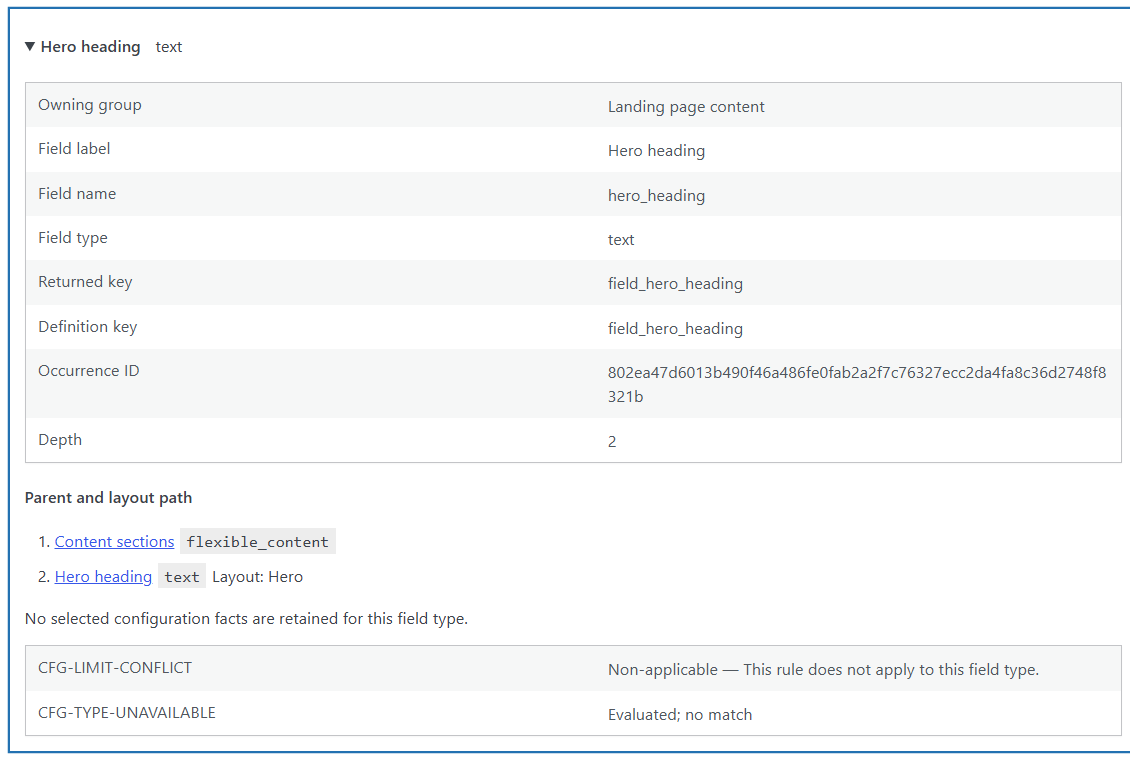
- Inspect field labels, names, types, returned keys, and distinct field occurrences.
- Follow parent paths through Groups, Repeaters, and Flexible Content layouts exposed by ACF.
- Review selected settings, including supported field limits, relational targets, return formats, and Repeater pagination settings.
- Inspect clone-expanded occurrences and retained layouts, including empty layouts.
- Navigate every retained group, field, layout, and finding through read-only pagination.
Repeaters, Flexible Content, and Clone context are available when the installed ACF version exposes those definitions. KMS Field Health works with ACF Free and ACF PRO; it does not install or activate ACF.
Review specific configuration findings
Version 0.2.0 checks two configuration conditions:
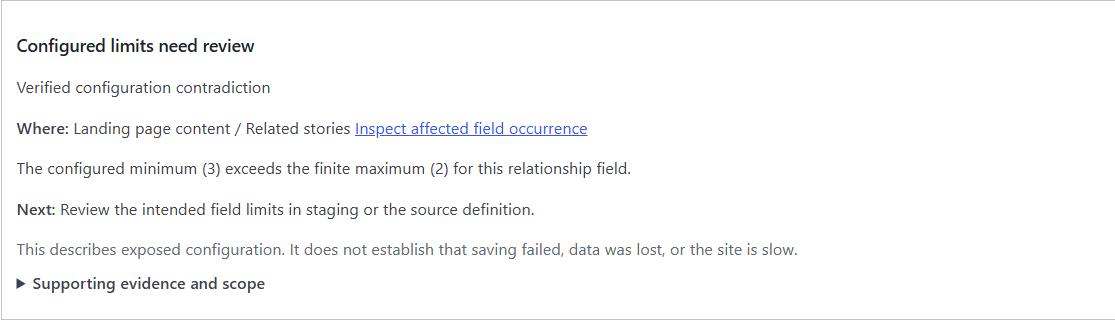
- A supported Relationship, Repeater, or Flexible Content field has a confirmed minimum greater than its finite maximum.
- An exposed field type is explicitly unregistered in the inspected, initialized ACF request.
Each finding identifies the affected field occurrence and group, explains the evidence, and suggests a safe next action. Follow the finding directly to its field in the Structure Explorer. Unknown settings, inactive groups, and incomplete coverage are handled separately from detected findings.
These checks do not establish that saving failed, data was lost, or a site is slow. Type registration can differ between requests and integrations.
Understand coverage and environment facts
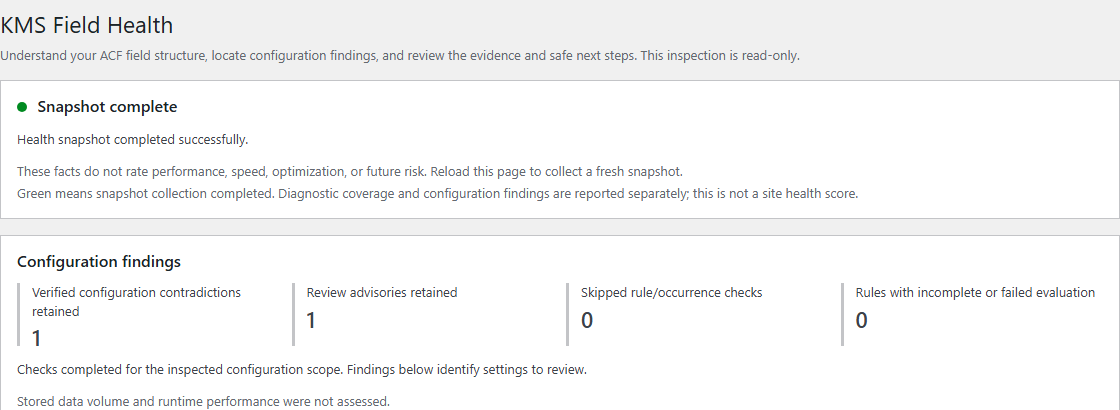
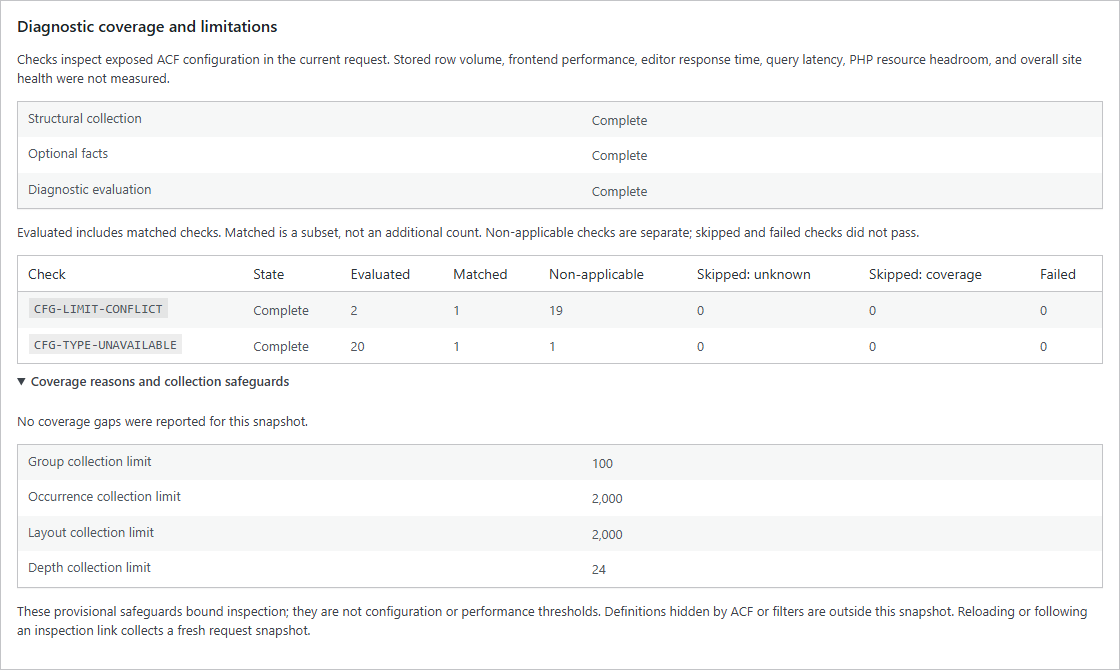
Collection status and diagnostic coverage are reported separately. Green means snapshot collection completed; it is not an overall site health score. Collection safeguards can leave a partial inventory, and partial counts are not presented as complete site totals. Following an inspection link collects a fresh request snapshot.
The page also reports ACF availability and version, detectable PRO/field-type availability, counts by type, nesting, WordPress/PHP versions and limits, environment type, external object cache use, and configured Local JSON paths when determinable.
Read-only and privacy-conscious
Snapshots last only for the current Health-page request. KMS Field Health does not modify fields, groups, posts, configuration, or content. It does not scan stored field values or post-content data, create diagnostic database tables or options, or automatically send diagnostics anywhere.
There is no telemetry, external diagnostic service, background monitoring, registration form, or paid-feature requirement. All plugin assets are local. Runtime performance, stored-data volume, and overall site health are not assessed. Automatic repairs and optimization are not included.
Open Health and get support
Choose Field Health in the WordPress Admin Bar, or Health beside the plugin on the Plugins screen. Access requires the manage_options capability, normally held by administrators. There is no permanent sidebar menu or settings page. Without ACF, the plugin still activates and shows environment facts with an unavailable ACF snapshot.
Help & Feedback links to the official support forum: https://wordpress.org/support/plugin/kms-field-health/. Opening the forum is your choice; no diagnostic information is automatically submitted. Avoid posting sensitive site details in public support requests.
Screenshots
Installation
- Install KMS Field Health from Plugins > Add New Plugin, upload its ZIP, or place the kms-field-health folder in /wp-content/plugins/.
- Activate KMS Field Health on the Plugins screen. Use an existing ACF Free or ACF PRO installation to inspect ACF definitions.
- As an administrator, choose Field Health in the Admin Bar or Health beside the plugin on the Plugins screen.
- Select a field group in the Structure Explorer. Open a field to inspect its identity, nested context, selected settings, and diagnostic outcomes.
- If a finding appears, review its evidence and safe next step before changing your ACF configuration in an appropriate development or staging environment.
FAQ
-
What can I inspect immediately?
-
The Structure Explorer shows field groups and the field occurrences exposed by ACF, with labels, names, keys, types, nested paths, layouts, and selected settings. You can use it without any findings or account registration.
-
Which problems does version 0.2.0 detect?
-
Two configuration conditions: a confirmed minimum greater than a finite maximum on supported Relationship, Repeater, or Flexible Content fields; and exposed field types explicitly unregistered in the initialized request. It does not detect every possible ACF issue or inspect stored field values.
-
Does this fix or optimize my fields?
-
No. Findings provide evidence and safe next actions for you to review. KMS Field Health does not change configuration, repair data, measure runtime performance, or optimize your site.
-
Does green mean my site is fast or optimized?
-
No. Green means only that snapshot collection completed. Configuration findings and diagnostic coverage are reported separately. Empty findings do not prove that every check was applicable or that the site has no other issues.
-
What happens without ACF?
-
KMS Field Health still activates and the Health page remains accessible. ACF structure information is unavailable; independently available WordPress/PHP environment facts remain visible. The plugin does not install or activate ACF.
-
Do I need ACF PRO or a KMS subscription?
-
KMS Field Health has no subscription, registration, or license-activation requirement. ACF Free works for definitions it provides. Repeater, Flexible Content, and Clone context depend on the corresponding features being available in your installed ACF version.
-
How are fields and depth counted?
-
Counts describe field occurrences returned by ACF’s definition APIs, including clone expansion performed by ACF. They are not a count of unique stored definitions. Exposed sub_fields and Flexible Content layout subfields are traversed. Top-level fields have depth 1, empty structures have depth 0, and layouts do not add a level. Custom types are counted, but opaque custom containers cannot be inspected. Groups include registered PHP/JSON definitions and inactive groups when ACF exposes them; filters may change what ACF returns.
-
Why can collection or diagnostic coverage be incomplete?
-
An API may be unavailable, a setting or identity may be uncertain, or a collection safeguard may stop retention. Skipped and uncollected configurations are not treated as clean. The page explains coverage and keeps retained records reachable. Safeguards do not guarantee a universal request-time or memory bound because ACF loads definitions before KMS Field Health can inspect them.
-
Does Local JSON detection inspect files?
-
No. It reports ACF’s filtered configuration settings. Paths do not prove that files or folders exist, are writable, or are used. Additional load filters and item-specific save filters may change the paths ACF uses. Unsupported or ambiguous settings display „Not determined.“ Local JSON absence is not a warning.
-
Is data changed, stored, or sent anywhere?
-
KMS Field Health does not change your fields or content, persist diagnostic snapshots, or automatically transmit diagnostics. No stored field values or post-content data are scanned. Collection reads ACF configuration; WordPress and ACF continue to perform their own normal platform work.
-
Does it work on multisite?
-
The Health page is per site, including when network activated. It is not a network-wide report. Open a site’s dashboard with manage_options access.
-
Where can I ask for help or send feedback?
-
Use Help & Feedback on the Health page or visit https://wordpress.org/support/plugin/kms-field-health/. The forum is public; share only information you are comfortable publishing. Diagnostics are never uploaded automatically.
Reviews
There are no reviews for this plugin.
Contributors & Developers
“KMS Field Health” is open source software. The following people have contributed to this plugin.
Contributors
Translate “KMS Field Health” into your language.
Interested in development?
Browse the code, check out the SVN repository, or subscribe to the development log by RSS.
Changelog
0.2.0
- Explore identifiable ACF field groups and field occurrences, including supported Repeater, Flexible Content, and Clone contexts and nested paths.
- Review evidence-based configuration findings for contradictory minimum/maximum settings (CFG-LIMIT-CONFLICT) and field types explicitly unregistered in the inspected ACF request (CFG-TYPE-UNAVAILABLE).
- Inspect finding evidence, affected field context, and safe suggested next steps.
- Understand Diagnostic Coverage, including evaluation limits, unknown states, and partial collection results.
- Navigate retained records through bounded, read-only pagination.
- Reach Help & Feedback through the official WordPress.org support forum.
0.1.0
- Initial read-only ACF configuration and WordPress/PHP environment snapshot.
- Capability-gated Health page, Admin Bar link, and Plugins screen Health link.
- Optional ACF Free/PRO detection and safe operation when ACF is absent.