

Description
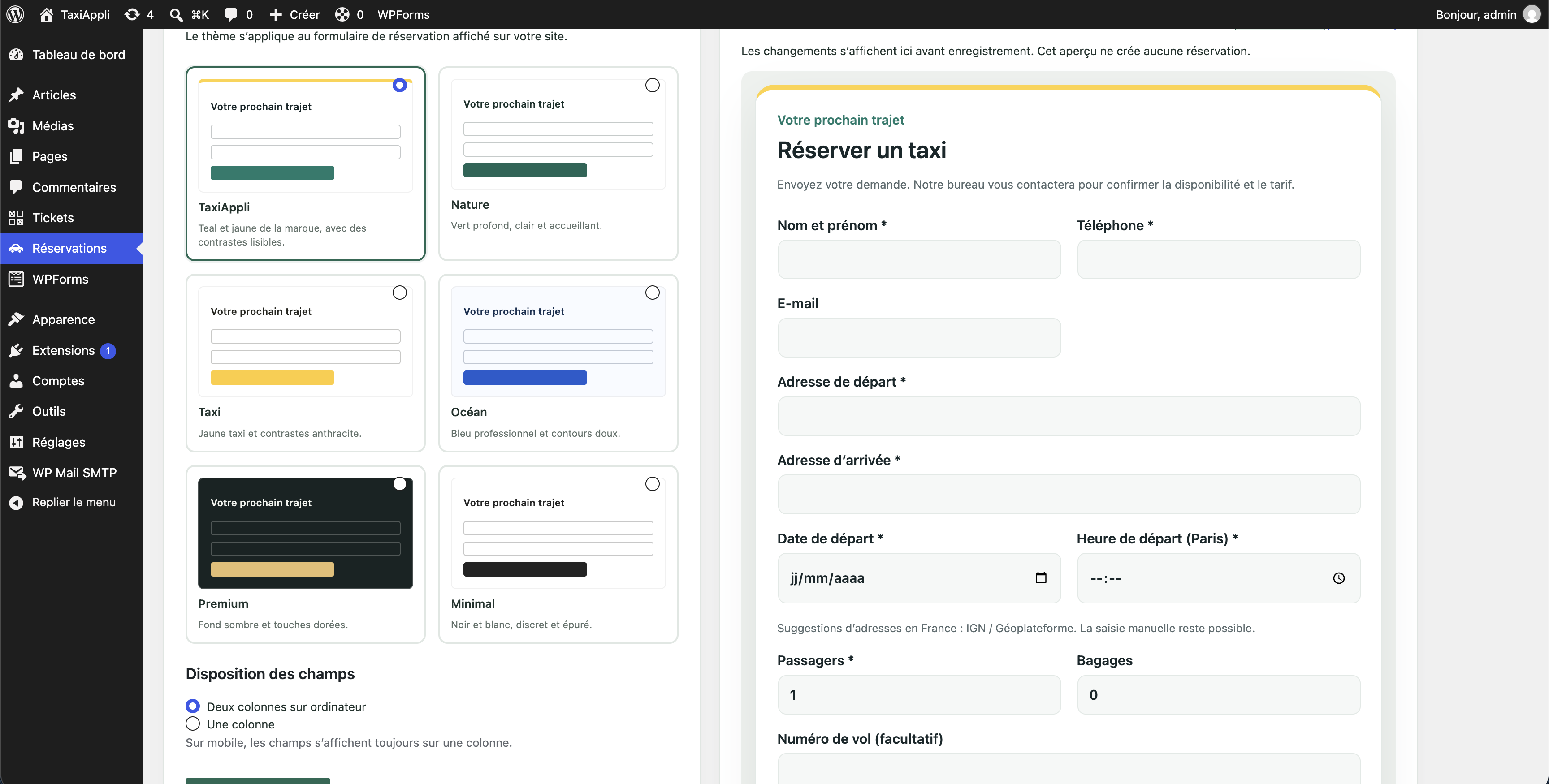
- Responsive booking form for passenger details, pickup and dropoff addresses, date and time, luggage, passengers, flight number and notes.
- French address suggestions backed by IGN / Géoplateforme without requiring an API key.
- Keyboard, mouse and touch-friendly suggestion selection with manual entry always available.
- Browser autofill support for contact details.
- A brand-aligned TaxiAppli theme with teal and yellow accents, available in the design preview.
- Optional passenger receipt and a reminder 24 hours before departure after successful dispatch.
- Configurable custom text, choice-list and checkbox fields.
- Local booking editing and cancellation with clear warnings that sent changes are not synced to dispatch.
- Monthly departure calendar with daily transmission indicators, monthly summaries and a selected-day agenda.
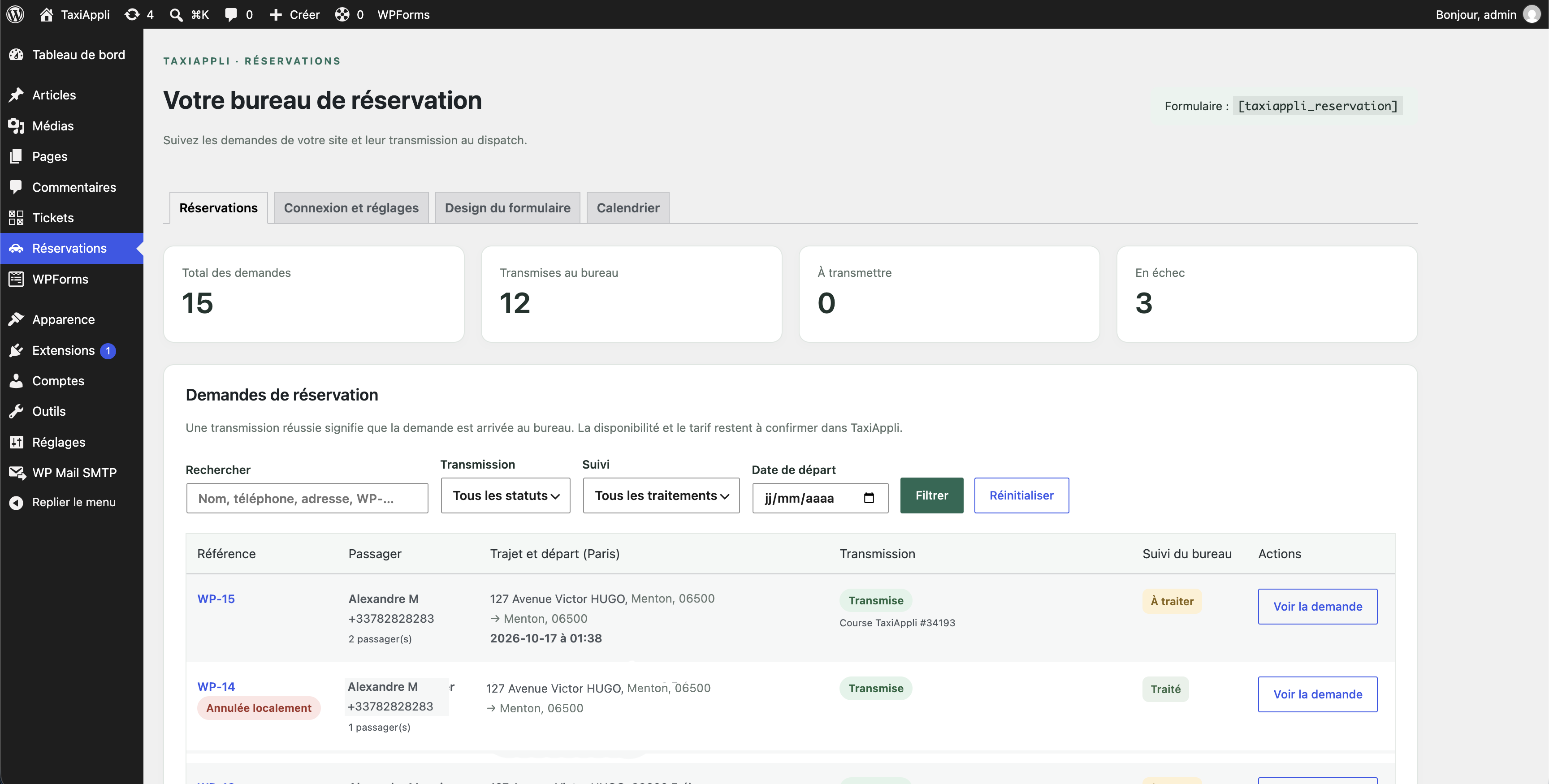
- Each request is stored in a dedicated WordPress table.
- Configurable delivery to the TaxiAppli connector or directly to a dispatch e-mail address using SMTP or Mailgun.
- HTTPS server-to-server transmission with secrets never exposed in the form.
- Unique request references and retry logic to avoid duplicate submissions.
- Admin dashboard with counters, search, filters, detail views, retry actions and CSV export.
Requests are queued for confirmation of availability and fare by the dispatch office. No payment is collected and no driver is assigned automatically.
External services
TaxiAppli: each accepted request is sent to the configured connector URL. The payload includes passenger details, itinerary, date/time, passenger count, luggage count, flight number and notes. The TaxiAppli server must be running the provided connector and have an active subscription for the dispatch office.
IGN / Géoplateforme: if address autocomplete is enabled, after 3 characters and 350 ms of inactivity, the browser sends the search text to https://data.geopf.fr/geocodage/completion/. The service also receives the browser IP address. No TaxiAppli key, name, phone number or email is sent. No call is made when the feature is disabled. Suggestions cover France and may include stations and airports. Manual entry remains available if the service fails.
SMTP: when e-mail delivery is selected, booking details are sent from the WordPress server to the configured SMTP provider and recipient(s). The provider may be any SMTP-compatible mail service. SMTP credentials are stored in the WordPress options and are never exposed in the form.
Mailgun: alternatively, booking details are sent from the WordPress server to the Mailgun API endpoint for the selected US or EU region. The API key and domain are stored in WordPress and are never exposed in the form.
Passenger email: when a passenger supplies an email address, the plugin sends a receipt stating that the request is not yet a confirmed trip. Once dispatch transmission succeeds, a reminder is scheduled 24 hours before departure. These messages use the configured SMTP or Mailgun provider when available, otherwise WordPress wp_mail. Passenger email, trip details and custom-field answers are sent to the selected mail service. Reminders require WP-Cron (a server cron is recommended); a late cron run will not send a reminder after the departure time.
Documentation: https://cartes.gouv.fr/aide/fr/guides-utilisateur/utiliser-les-services-de-la-geoplateforme/autocompletion/
Operation
Departure dates are interpreted in Europe/Paris, including daylight saving changes. Minimum delay: 15 minutes; horizon: 12 months. Up to five automatic transmission attempts are allowed. Retries depend on WP-Cron; configure a server cron job if needed. An administrator may retry a failed request manually. Old requests that were not received by TaxiAppli should be processed manually by the office.
Administrators can edit or cancel requests locally. These actions never update a request already sent to the TaxiAppli dispatch or an email recipient; contact the office separately. Custom fields are included in the booking payload and CSV export. An optional passenger email is needed for receipt and departure reminder messages.
Data and settings are preserved when the plugin is deactivated or deleted. Manage retention according to your site privacy policy and internal procedures. The secret key is stored in WordPress options; protect backups and access to the database.
Third-party services
This plugin uses the following external services to provide taxi booking functionality.
1. TaxiAppli – Booking request transmission
Service: TaxiAppli – Taxi dispatch and reservation management.
Purpose: Transmit taxi booking requests from the WordPress website to the TaxiAppli dispatch office for processing, availability confirmation and fare quotation.
Data transmitted:
* Passenger name
* Phone number
* Email address
* Pickup and destination addresses
* Requested pickup date and time
* Number of passengers and luggage items
* Flight number, if provided
* Additional booking notes
* Unique booking reference
When data is transmitted:
Data is transmitted when a visitor submits a valid booking request through the reservation form. Failed transmissions may be retried automatically or manually by an administrator.
How data is transmitted:
Requests are transmitted server-to-server over HTTPS to the TaxiAppli connector URL configured by the website administrator. Authentication uses a secret key stored on the WordPress server and never exposed to visitors.
Service provider: TaxiAppli
Service website: https://taxiappli.com/
Booking information is processed by the TaxiAppli dispatch office responsible for handling the reservation.
2. IGN / Géoplateforme – Address autocomplete
Service: Géoplateforme address autocomplete, provided by IGN (Institut national de l’information géographique et forestière).
Purpose: Suggest French addresses, railway stations and airports while visitors enter pickup or destination locations.
Service endpoint:
https://data.geopf.fr/geocodage/completion/
Data transmitted:
* Text entered in the pickup or destination address field
* Visitor IP address, as part of the HTTPS connection
No passenger name, phone number, email address or TaxiAppli authentication key is transmitted to this service.
When data is transmitted:
Only when address autocomplete is enabled by the website administrator and a visitor enters at least three characters into an address field. Requests are sent after approximately 350 milliseconds of inactivity.
How data is transmitted:
The visitor’s browser sends HTTPS requests directly to the Géoplateforme autocomplete service.
If autocomplete is disabled, no requests are sent to this service. Visitors can always enter addresses manually.
Service provider: IGN – Institut national de l’information géographique et forestière
Service documentation:
https://cartes.gouv.fr/aide/fr/guides-utilisateur/utiliser-les-services-de-la-geoplateforme/autocompletion/
Privacy information:
https://www.ign.fr/institut/donnees-caractere-personnel
3. SMTP or Mailgun – E-mail delivery (optional)
Service: The SMTP provider configured by the website administrator, or Mailgun when its API is selected.
Purpose: Deliver booking requests directly to the configured dispatch e-mail recipient(s) instead of sending them to the TaxiAppli connector.
Data transmitted: Passenger name, phone number, e-mail address, itinerary, requested date and time, passenger and luggage counts, flight number, additional notes and booking reference.
When data is transmitted: When a visitor submits a valid booking request and the administrator has selected e-mail delivery. Failed attempts may be retried automatically or manually.
How data is transmitted: SMTP connections use the configured host, port and encryption settings. Mailgun requests use HTTPS to the selected regional API endpoint. Credentials are stored on the WordPress server and are not included in the booking form.
The website administrator is responsible for selecting a provider and recipient(s), reviewing their privacy terms and informing visitors about this data transfer.
Privacy considerations
Website administrators are responsible for informing visitors about the processing and transmission of personal data through their website privacy policy.
Booking requests are stored in the WordPress database and transmitted using the delivery method selected by the administrator: the TaxiAppli connector or the configured e-mail provider and recipient(s).
The plugin does not collect online payments and does not automatically assign drivers.
Website administrators should define appropriate data retention periods and ensure that their use of these services complies with applicable privacy regulations, including the GDPR. When e-mail delivery is selected, the administrator is responsible for the chosen SMTP or Mailgun provider and configured recipient(s).
Abonnement SMTP (version 1.5.0)
L’envoi SMTP nécessite une licence par site à 19 EUR par mois, gérée sur https://taxiappli.com/abonnement-smtp/. La clé et l’URL du site sont transmises au service de licences pour vérifier les droits. Les réservations restent conservées si la licence est inactive. Mailgun et le connecteur TaxiAppli ne sont pas soumis à ce contrôle.
Screenshots
Installation
- In WordPress, go to Plugins > Add New > Upload Plugin.
- Upload the taxiappli-reservations.zip archive and activate the plugin on the relevant site (network activation is not supported).
- In Reservations > Connection and settings, choose TaxiAppli or e-mail delivery.
- For TaxiAppli delivery, configure the wordpress_booking_api.php connector and enter its HTTPS URL and secret key. For e-mail delivery, enter the recipient and sender addresses, then configure an SMTP server or Mailgun API credentials.
- Set vehicle capacity and address autocomplete preferences.
- Add the shortcode [taxiappli_reservation] to any WordPress page.
The form remains closed until the selected delivery method is configured.

Contributors & Developers
“TaxiAppli Réservations” is open source software. The following people have contributed to this plugin.
Contributors
Translate “TaxiAppli Réservations” into your language.
Interested in development?
Browse the code, check out the SVN repository, or subscribe to the development log by RSS.
Changelog
1.4.2
- Improved the departure calendar with monthly totals, pending/error indicators, a today shortcut and a selected-day agenda.
- Improved calendar accessibility and responsive layout.
- Added optional passenger receipt emails and 24-hour pre-departure reminders after successful dispatch.
- Added up to eight configurable custom booking fields.
- Added local booking editing and cancellation, with dispatch-sync warnings.
- Added schema migration for local cancellation and notification status.
- Added a TaxiAppli-branded form theme and made it the default for new or unset design preferences.
- Versioned plugin assets by file modification time so browser caches refresh after updates.
1.4.1
Improvements to the licensing system
1.4.0
Added selectable TaxiAppli or e-mail delivery, with SMTP and Mailgun support.
1.2.0
Updated booking workflow, admin filtering and improved security and validation handling.
1.0.0
Initial release: booking form, IGN address suggestions, connector and admin request handling.