

Description
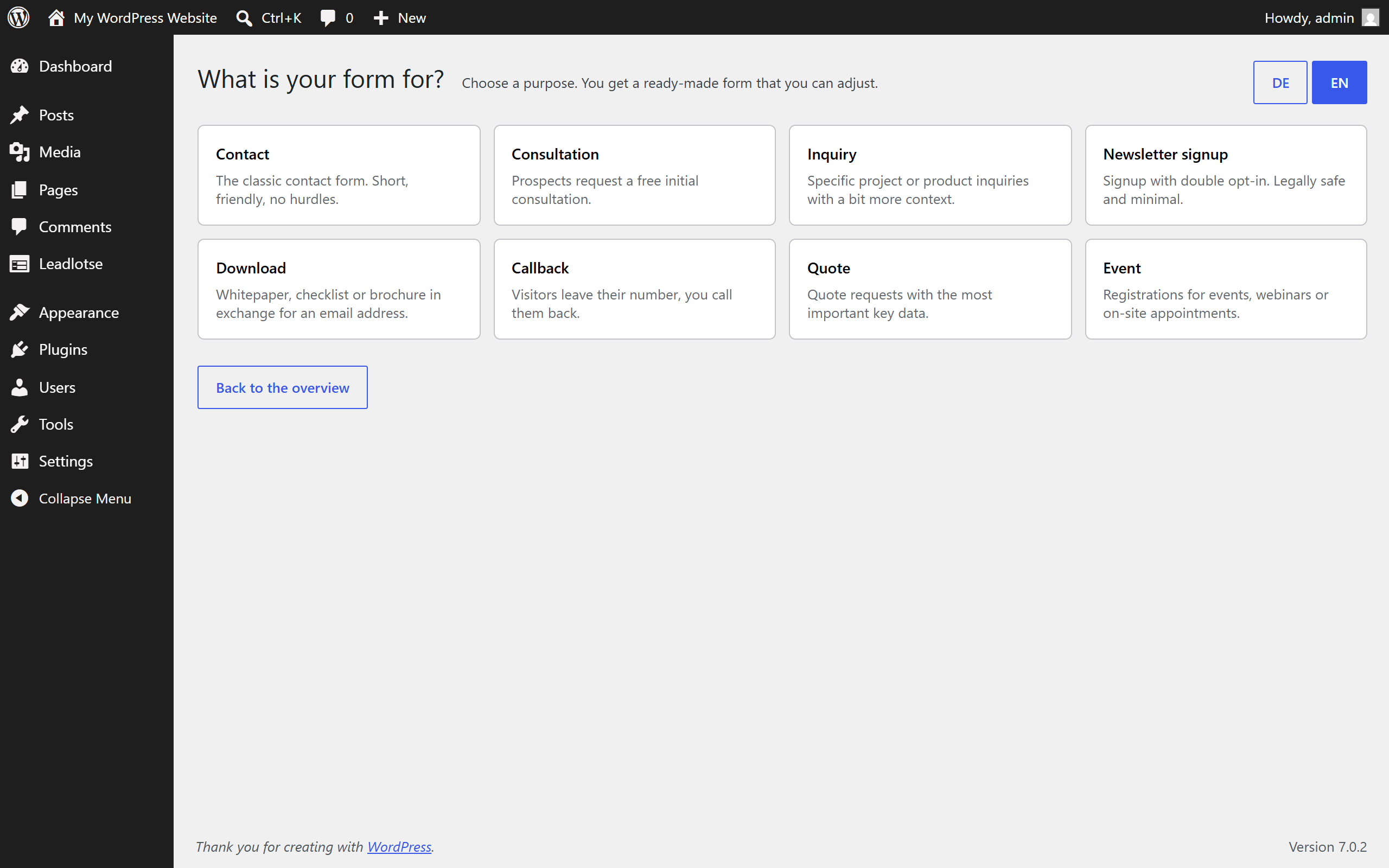
Leadlotse starts from the goal, not from an empty canvas. You pick a purpose – contact, consultation, inquiry, newsletter, download, callback, quote, event or event sign-up – and get a form that already has sensible fields, a consent text and a confirmation email. Your first form is live in minutes.
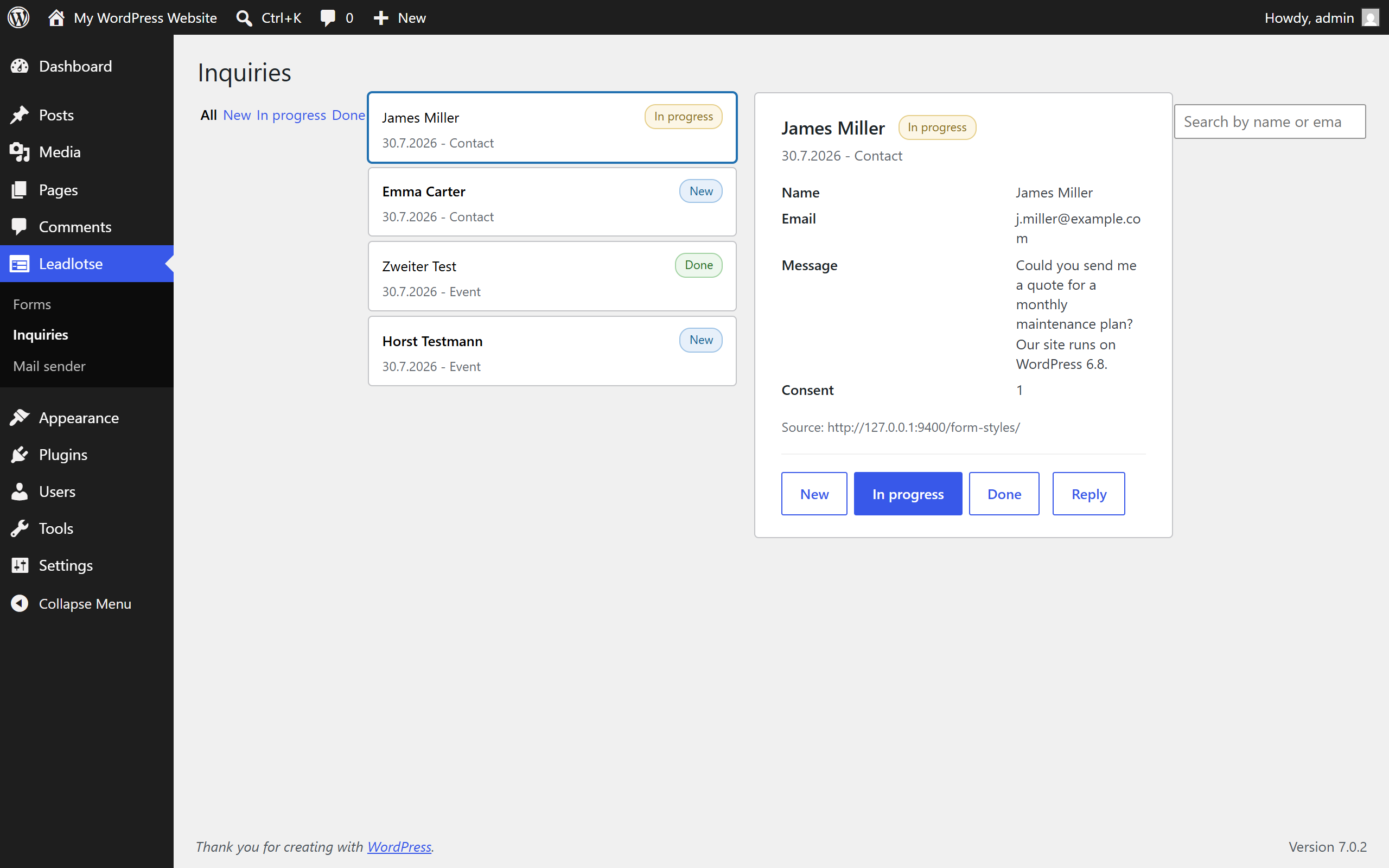
Every submission lands in a tidy inbox inside WordPress. No shared mailbox where inquiries drown. Each entry carries a status (new, in progress, done), and the plugin points it out when entries have been waiting too long for an answer.
What you get
- Purpose templates in English and German instead of an empty form builder
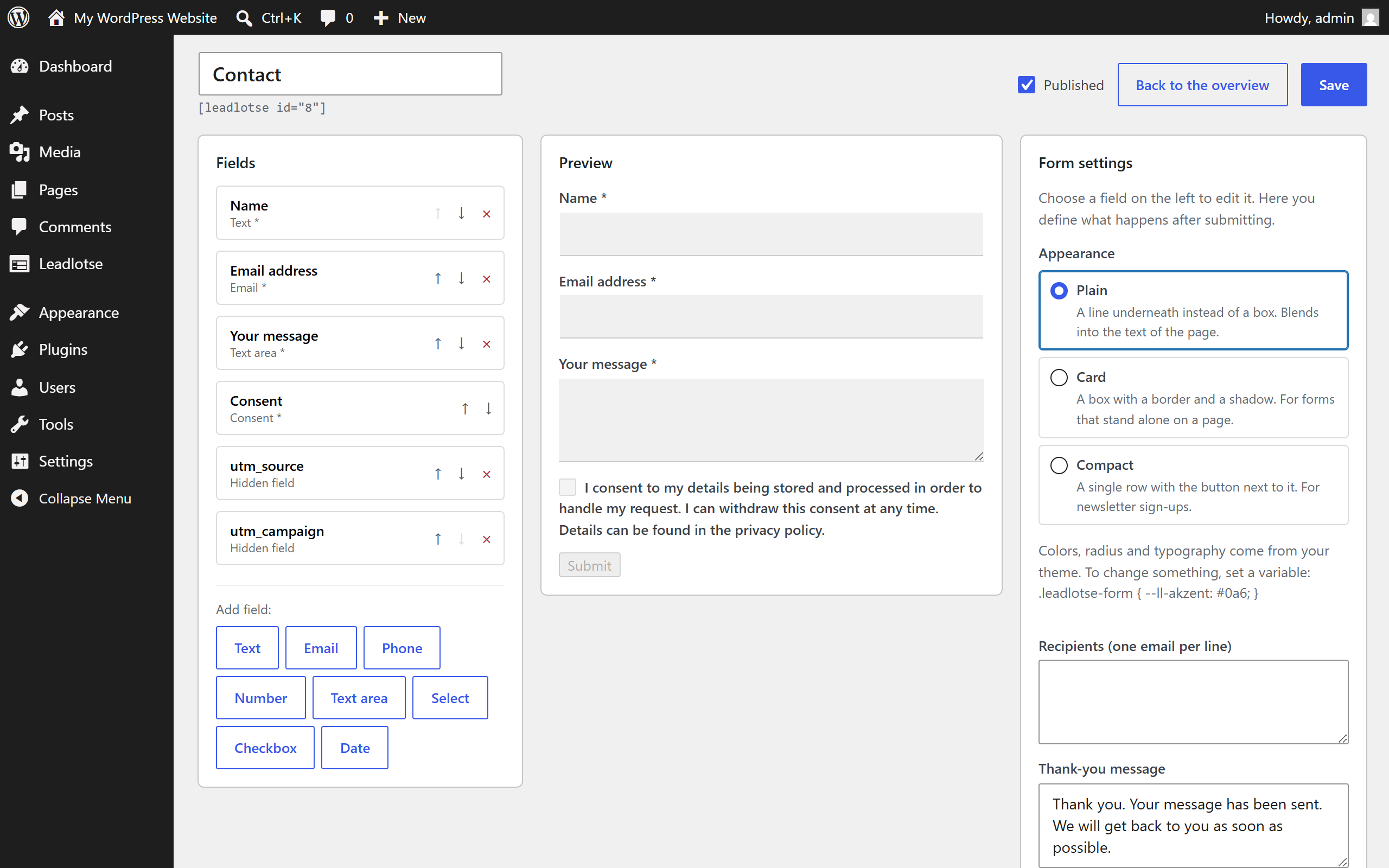
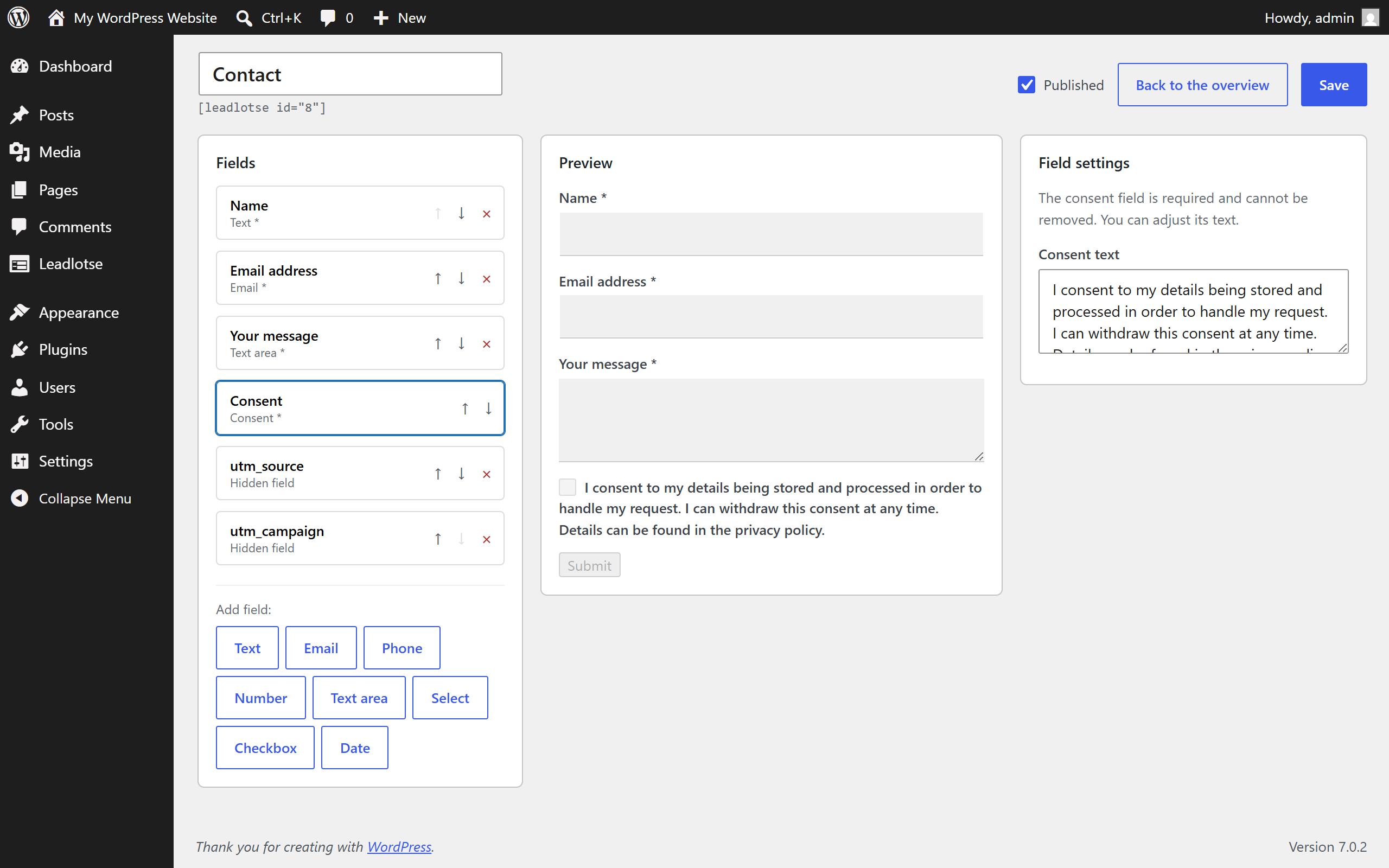
- Form builder with live preview: fields, preview and settings on one screen
- Inbox with status, search and filters
- Conditional fields: show a field only when another one has a certain value
- Double opt-in for newsletter sign-ups, with a signed confirmation link
- Spam protection without a captcha: honeypot, time trap and rate limiting per IP and form
- Field types for text, email, phone, number, date, select, radio, checkbox, consent and hidden attribution values
- GDPR tools: consent records with the exact text and version, data minimisation, retention period, and hooks into the WordPress data export and erasure requests
- Works without JavaScript: the form falls back to a classic POST and no submission is lost
- Accessible markup: every field has a label, errors sit at the field and are wired up with aria-describedby and aria-invalid
- Event sign-up: registration with capacity limit, confirmation by email, a ticket with a QR code and check-in from your phone
- Participant list per event, printable and exportable
- Gutenberg block and shortcode
- Your data stays on your server
No external services
Leadlotse processes submissions on your own server and sends email through the delivery path your WordPress installation already uses. It does not call any third-party API, loads no remote fonts, scripts or images, and collects no telemetry.
Who it is for
Small and medium businesses, local service providers, coaches and consultants who want to collect inquiries and lose none of them, without a large CRM or paid add-on services.
Event sign-up
One purpose template turns a form into a sign-up: guests register, everyone receives a ticket with a QR code by email, and at the door you scan it from your phone. A capacity limit closes the form once the event is full, cancellations free up their spot again, and the participant list shows who is expected. The QR code is generated on your server, the ticket page belongs to your site, and no data leaves it.
Leadlotse is part of the Hafenstudios fleet; it works on its own and cooperates with the other fleet plugins once they are active. An extended edition with messenger replies, quick fill via Google and Apple and multi-step forms is available at hafenstudios.com.
Screenshots
Blocks
This plugin provides 1 block.
- Leadlotse Form Embeds a Leadlotse form into the page.
Installation
- Upload the plugin under Plugins, Add New, or install it from the plugin directory.
- Activate it.
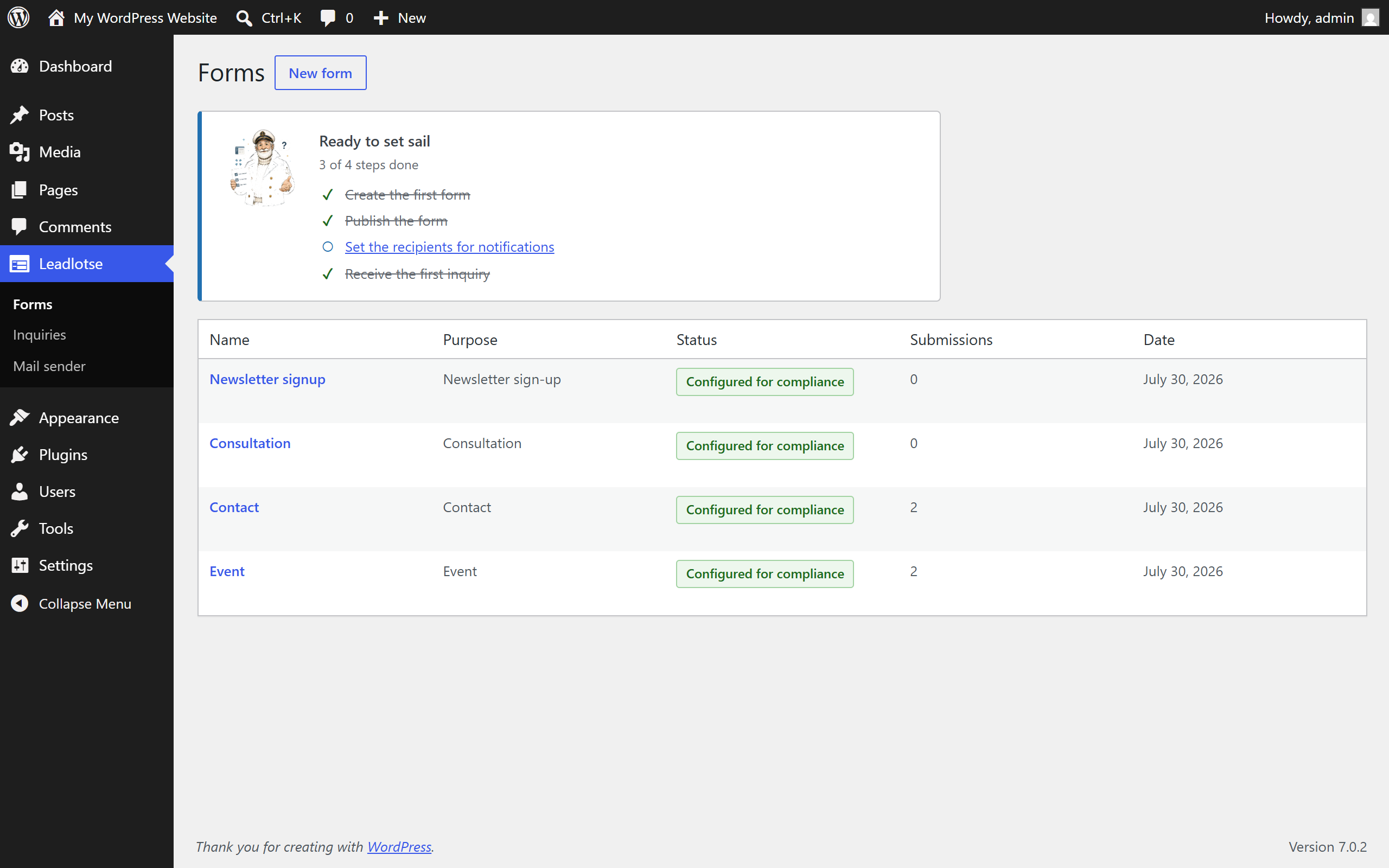
- Open the Leadlotse menu, choose „create first form“ and pick a purpose.
- Embed the form with the „Leadlotse Formular“ block or the shortcode.
FAQ
-
Does it call external services?
-
No. Leadlotse processes submissions on your own server and uses your WordPress installation for sending email. There is no third-party API call, no remote asset and no telemetry.
-
Can I use it in a GDPR-compliant way?
-
Leadlotse brings the tools: a consent record that stores the exact wording and version that was shown, data minimisation, an optional retention period, double opt-in for newsletter sign-ups, and integration with the WordPress data export and erasure requests. The legal wording, for example your privacy policy, remains your responsibility.
-
Do I need to write code?
-
No. You pick a purpose, adjust the fields and embed the form.
-
Does the form work without JavaScript?
-
Yes. Without JavaScript the form submits over a classic POST and shows the same result message.
-
Is the event sign-up included?
-
Yes. Sign-up, capacity limit, ticket with QR code, check-in and the participant list are part of this version. Nothing is locked.
-
Where do submissions go?
-
Into a custom database table, listed in the Leadlotse inbox. Notification and confirmation emails are sent through WordPress. Uninstalling can remove the table and the options again.
-
Can I change how the form looks?
-
Yes. Choose one of three appearances per form, and the form inherits colours, radius and typography from your theme. To adjust something you set a CSS variable rather than overriding rules.
Reviews


Contributors & Developers
“Hafenstudios Leadlotse – Form & Lead Manager” is open source software. The following people have contributed to this plugin.
Contributors
Translate “Hafenstudios Leadlotse – Form & Lead Manager” into your language.
Interested in development?
Browse the code, check out the SVN repository, or subscribe to the development log by RSS.
Changelog
1.5.1
- Fixed: The form builder saves with POST instead of PUT. Some hosts, proxies and WordPress Playground dropped the body of the request while the builder still reported „Saved“.
- Fixed: The preview of the Leadlotse block in the editor shows the form styles instead of a bare form.
- Fixed: A form in draft status shows editors a „Draft“ notice instead of failing only on submit.
- Security: The check-in page shows name, number of people and check-in time to authorised users only. Tickets expire two days after the event (after its end for events lasting several days, from the new end field or The Events Calendar), or twelve months after sign-up without a readable date. At the entrance there is no expiry.
- Security: A maximum length of 0 no longer lifts the length limit of a text field. Custom maximum lengths are capped (text 1,000, textarea 20,000 characters).
- Security: The time trap token is only valid for the form it was issued for. Pages from a page cache with older tokens keep working for 30 days after the update.
- Security: The rate limit counts in a fixed window and stores the IP address only as a salted hash.
- Improved: If the confirmation link cannot be stored, no email with a dead link goes out. The visitor gets a message and can try again, with or without JavaScript.
- Improved: Email scanners that open the confirmation link ahead of the recipient no longer trigger a second confirmation.
- Improved: For events without double opt-in, two simultaneous sign-ups for the last place no longer overbook the event.
- Improved: The daily maintenance (retention period, expired sign-ups) is scheduled again if its cron event got lost.
- Improved: Without JavaScript, a redirect after submit also leads to external pages, as it does with JavaScript, instead of ending on the WordPress login page.
- Improved: The ticket page loads its styles as a separate file, uses the language of the site and no longer needs an onclick attribute for the print button.
- Fixed: A time trap or honeypot field sent as a list instead of text no longer causes a PHP warning.
1.5.0
- New: An Excel workbook across all events, with an „Overview“ sheet and one sheet per event: sign-ups, guests, people in total and those not confirmed yet, plus a totals row. The CSV export stays as a fallback.
- New: A printable check-in list for the day of the event, alphabetical, with guests and a tick column.
- New: Duplicate sign-ups from the same address are marked, only the latest one counts. Entries can be marked as a test and then drop out of counts, capacity and export.
- New: Unconfirmed sign-ups no longer take a seat, are counted separately, get one reminder after 24 hours with a fresh confirmation link, and expire after a period you set (7 days by default).
- New: Guests count towards capacity, people in total and the export.
- New: A summary for the organiser, daily or weekly. Off by default.
- New: A link to The Events Calendar when it is active. Title, date and location then come from there, capacity and sign-ups stay here. The event list shows the number of confirmed sign-ups.
- New: Reply straight from the inbox instead of opening a mailto link. Answered inquiries are marked as such and the text of the reply stays with the entry.
- New: Form of address per form. A new form is created in formal or informal German, existing texts stay untouched.
- New: Event sign-up is part of every edition now, including this one: registration with a capacity limit, a ticket with a QR code, check-in and the participant list.
- New: A proof of work instead of a captcha. The browser solves a small puzzle in the background while somebody fills in the form. No third-party service, no image puzzles, no data leaving your site. Without JavaScript nothing changes and no form becomes unusable.
- New: Entries can be deleted one by one. The matching consent record goes with them.
- New: The event sign-up template now also asks for last name and organisation.
- New: Every purpose template brings its own submit button label instead of a generic „Submit“.
- New: After activation Leadlotse opens the empty state with the purpose tiles once, instead of leaving you on the plugin list.
- Fixed: Special characters stored incorrectly by version 1.2.0 are repaired once. The state before the repair is kept, and the result is shown on the form list.
- Fixed: Sign-up times were shown in UTC instead of the time of your website in the participant list, the export and the check-in page. If your site has no timezone set, the setup checklist says so.
- Fixed (added to the record): Forms in draft status are no longer rendered for visitors. Logged-in editors still see them, so a form can be checked before it goes live.
- Improved: The labels of the block editor were in no translation catalogue and stayed English on non-English sites.
1.4.4
- New: twelve ready-made styles for a form (Trade, Law firm, Practice, Coaching, Restaurant, Club, Minimal, High contrast, Night, Pastel, Tech and the theme’s own look), plus your own accent colour, three densities and a corner radius. The contrast of the button text is checked while you pick.
- New: the template gallery shows real previews in groups (Requests, Sales, Lists, Appointments) instead of a plain list, and the templates are fetched when you open the gallery instead of being printed into every page.
- New: duplicate a form from the list. The copy carries all fields and settings and opens as a draft.
- New: a thank-you stage after sending, with your own heading and text, instead of a single line of confirmation.
- Fixed: the plugin asked for translations before WordPress loads them. Every page view logged „_load_textdomain_just_in_time was called incorrectly“; where error display is switched on, that notice was printed before the headers and any cookie or redirect after it failed.
- Fixed: the rename of the stored data introduced in 1.4.3 could be marked as done even when it had not run – on a database user without ALTER rights the entries stayed in the old table and the inbox stayed empty, without a word of warning. The rename is now retried until it has demonstrably succeeded.
- Fixed: pending migrations now also run outside the admin area. After an automatic update over cron or WP-CLI there was a window in which the entries table did not exist yet: submissions failed and a double opt-in confirmation could not find its sign-up.
- Improved: the builder no longer builds two previews of the same form.
- Improved: tested with WordPress 7.1.
1.4.3
- Improved: every submitted value is sanitised centrally, before any extension sees it. The request snapshot handed to spam filters is now a sanitised excerpt of the request headers instead of the raw server environment.
- Improved: HTML returned by the leadlotse_form_fields filter is limited to input elements before it is printed.
- Improved: longer prefixes for stored data. The form post type, the entries table and the plugin transients now carry the plugin name; existing installations are migrated on update.
- Improved: source strings are English. German is delivered as a translation, and other languages can be contributed on translate.wordpress.org.
1.4.0
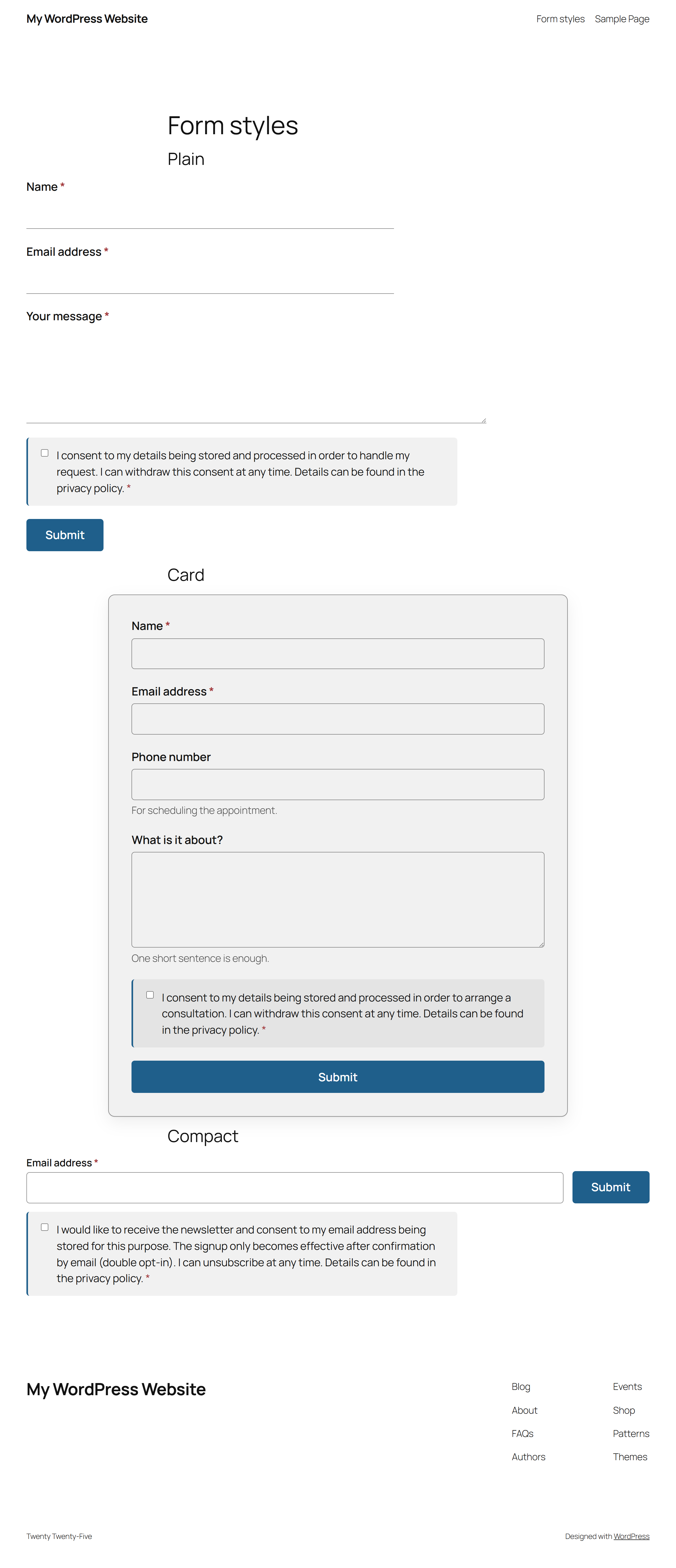
- New: three appearances per form – plain (a bottom line instead of a box), card (border and shadow) and compact (single row, for newsletter sign-ups). Selected in the builder, the preview follows.
- New: the form inherits colours, radius and typography from your theme without a line of CSS. To change something you set a variable instead of a rule, for example .leadlotse-form { –ll-akzent: #0a6; }.
- New: a visible sending state on the submit button (ring, label, disabled) so nobody clicks twice on a slow connection.
- New: error messages sit at the field instead of only being collected at the top, including the ones from the browser, and are wired up with aria-invalid and aria-describedby. They disappear as soon as the input is valid.
- New: the consent field gets its own calm row instead of being small print between two fields.
- New: attribution values (ref and utm_*) survive a detour over other pages. Somebody who arrives on a blog post through ?ref=partner and only then clicks to the form is attributed correctly. This is remembered for the session only, without a cookie, and can be switched off.
- New: the empty state offers the three most common purposes as tiles and leads into the builder with one click.
- New: the label of the submit button is stored again. It was read when rendering but silently dropped when saving.
- New: every field id of a submission can be used as a {fieldid} placeholder in the subject and body of the notification and confirmation email, next to {name}, {first_name}, {form} and {site}.
- Fixed: if a form definition cannot be stored, the editor now reports an error instead of showing success while the change is gone. The value is read back after writing and compared.
- Improved: German field names are recognised. A field named „vorname“ or „nachname“ now yields a contact with a name; if no name field exists, the display name is built from first and last name.
- Improved: hidden fields store up to 500 instead of 200 characters, so long campaign ids are no longer truncated.
- Improved: table names in database queries use the %i identifier placeholder throughout.
- Improved: borders and error colours follow the page rather than the operating system and meet the contrast requirements in both light and dark.
1.2.0
- New: number field with an optional minimum and maximum.
1.1.0
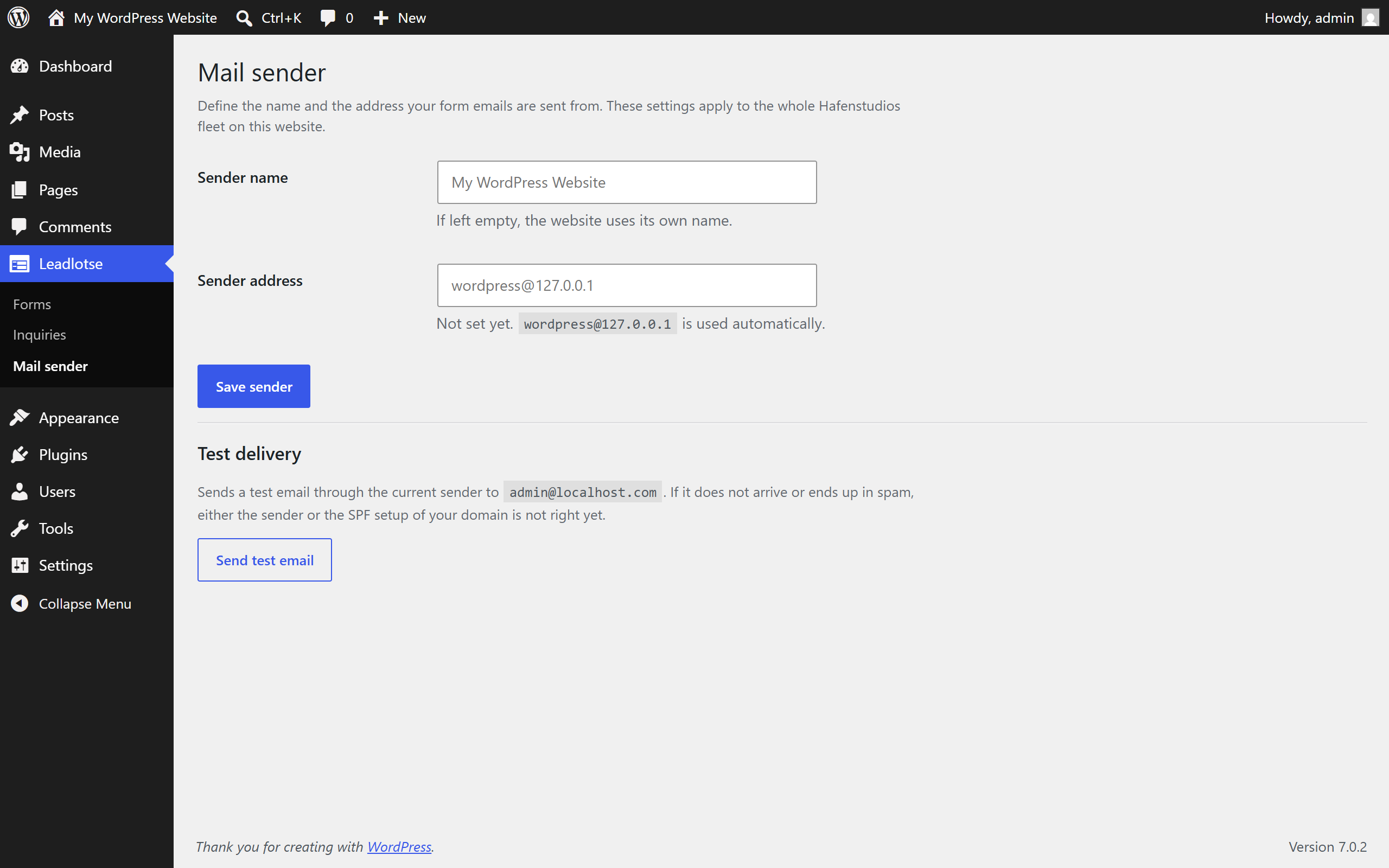
- New: mail sender settings page with a test mail and deliverability hints.
- Improved: stricter phone number validation.
1.0.0
- First release: form builder, purpose templates in English and German, inbox, conditional fields, double opt-in, spam protection, GDPR tools, Gutenberg block and shortcode.